
Did you know that improper posture at a standing desk can lead to discomfort and decreased productivity? As more people transition to standing desks, it’s essential to understand how to stand correctly to enhance your workplace wellness. By mastering proper standing posture, you can alleviate strain, boost your energy, and improve your overall cognitive performance. This guide will delve into practical techniques for achieving ‘posture perfection’ that not only help prevent fatigue and discomfort but also optimize your work environment for better focus and efficiency. Whether you’re new to standing desks or seeking to improve your current setup, you’ll discover valuable insights to transform your work habits and enhance your well-being. Keep reading to unlock the secrets to standing healthier and more effectively!
Understanding the Importance of Standing Desk Posture
Standing desks are quickly becoming essential tools for promoting workplace wellness and enhancing cognitive health. The key to reaping these benefits lies in maintaining proper posture while standing. When you stand correctly, it minimizes the risk of discomfort and fatigue, allowing you to focus on your tasks rather than distracting aches and pains. Recent studies have shown that individuals who adopt effective standing postures report increased productivity and better overall well-being.
To achieve optimal standing desk posture, it’s crucial to be mindful of several factors. First and foremost, your feet should be shoulder-width apart, providing a solid base of support. Distributing your weight evenly across both feet helps avoid joint strain and muscle fatigue. Engaging your core while keeping your shoulders relaxed and arms at a 90-degree angle not only supports your spine but also enhances blood flow, making you feel more energetic and engaged in your work.
Another vital aspect of standing desk ergonomics is the alignment of your computer screen. The top of your monitor should be at eye level to prevent neck strain. Positioning it about an arm’s length away promotes a natural head posture, further contributing to comfort. By continuously checking your posture and making small adjustments throughout the day, you can create a more pleasant and productive work environment, leading to improved cognitive function and reduced stress. Prioritizing your standing posture is not just about comfort; it’s a proactive approach to safeguarding your health and supporting your brain’s performance now and in the long run.
Key Principles of Ergonomic Standing Desk Setup
Creating a workspace that encourages productivity and enhances cognitive health begins with understanding ergonomic principles. A well-structured standing desk setup not only promotes better posture but also minimizes discomfort and fatigue, allowing you to focus on your tasks with increased energy and efficiency. Among the foundational elements of an ergonomic standing desk is the desk height, which should be adjustable to accommodate different users and tasks. Research shows that an adjustable desk can significantly reduce strain on the body by allowing the user to maintain a neutral spine while working.
To ensure optimal ergonomics, follow these key principles when setting up your standing desk:
Monitor Height and Position
The top of your monitor should be at or just below eye level. This positioning reduces neck strain and allows for a natural resting position of the head. Ideally, the screen should be about an arm’s length away, which helps to maintain comfortable posture and limits eye fatigue. Using a monitor stand or an adjustable arm can help facilitate this alignment.
Desk Height
When standing, your elbows should be at a relaxed angle of about 90 degrees when your hands are on the keyboard. The desk surface should be roughly at elbow height, which can be achieved through adjustable desks or desk risers. If your desk is too high or low, it can lead to shoulder strain and other musculoskeletal issues over time.
Foot Placement and Weight Distribution
Position your feet about shoulder-width apart to provide stability. Shift your weight from one foot to the other periodically to prevent stiffness. For added comfort, consider using a footrest or balance board, which can encourage subtle movement and improve circulation.
Engaging Your Core
An often-overlooked aspect of standing desk ergonomics is engaging your core. This muscle engagement supports your spine and can alleviate pressure on your lower back. Consider incorporating brief exercises or stretches throughout your day to reinforce core strength and promote overall wellness.
By committing to these ergonomic principles, you set the stage for a healthier work routine that encourages movement and fosters cognitive clarity. Regular adjustments and awareness of your posture can transform your standing desk experience from merely functional to truly empowering, supporting both physical comfort and mental acuity.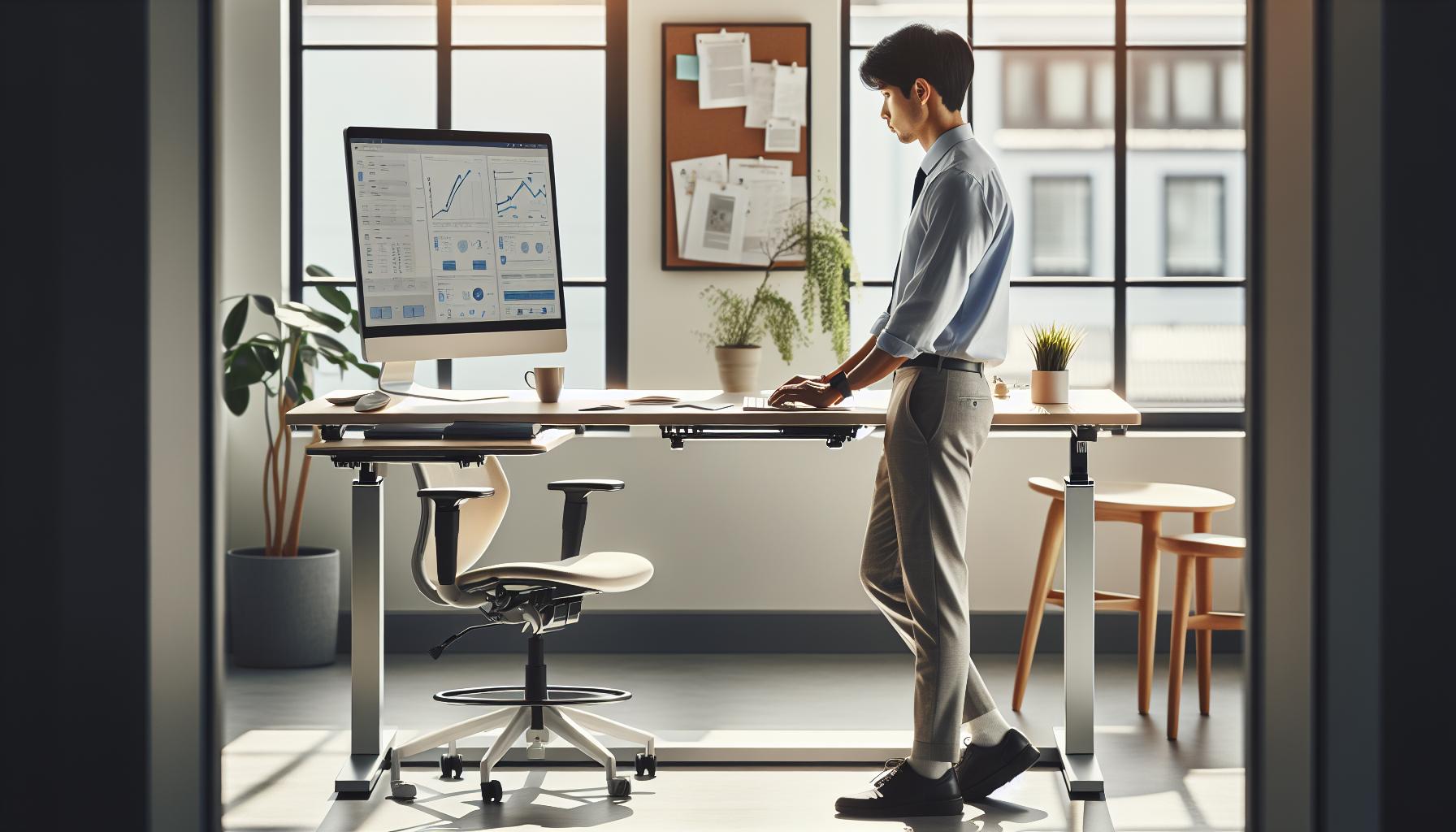
Ideal Foot Placement and Weight Distribution Techniques
The foundation of standing desk ergonomics begins at your feet. Proper foot placement and weight distribution can dramatically impact your comfort, energy levels, and productivity throughout the day. When you place your feet correctly, you foster stability and balance, which can help minimize fatigue and discomfort. In fact, research indicates that those who practice effective posture techniques while standing can experience significant physical benefits, including reduced strain on their back and neck.
To achieve optimal foot placement, position your feet approximately shoulder-width apart. This stance provides a stable base, which not only improves balance but also encourages proper alignment of your hips, knees, and ankles. Consider maintaining a slight bend in your knees, as this can help reduce pressure on your joints, allowing for a more comfortable stance. Here are some additional techniques to foster effective weight distribution:
Weight Shifting Techniques
- Dynamic Movement: Instead of keeping your weight fixed on one foot, shift your weight periodically from one foot to another. This simple adjustment can help alleviate stiffness and improve circulation.
- Use of a Footrest: A footrest allows you to elevate one foot slightly while standing. Alternating between feet on the footrest can distribute weight more evenly and reduce strain on the lower back.
- Engage Your Calves: Standing on your toes for brief intervals can stretch your calves and enhance lower leg strength. Incorporate this movement every so often to keep your body engaged.
Another essential aspect of standing desk ergonomics is mindful attention to footwear. The right shoes can support your weight evenly and provide cushioning, which makes a significant difference during long work hours. Look for shoes with arch support and cushioned soles to enhance comfort while standing.
By implementing these methods and maintaining good foot placement and weight distribution, you’ll not only improve your physical comfort but also boost your overall wellness and productivity. Staying attuned to how your feet feel and adjusting your posture accordingly can lead to a more enjoyable and productive work experience.
Maintaining a Neutral Spine for Optimal Health
To maintain optimal health while standing at your desk, keeping a neutral spine is essential. A neutral spine is one that maintains its natural curves: the cervical (neck) should be slightly forward, the thoracic (mid-back) should have a slight curve out, and the lumbar (lower back) should curve inward. This alignment helps distribute your body weight evenly across your spine, reducing the risk of strain and injury. Adequate spinal alignment is not just about comfort; it’s crucial for maintaining cognitive function and overall physical health.
To achieve a neutral spine, start by positioning your head over your shoulders instead of leaning forward or backward. Your ears should align with your shoulders, and your shoulders should be relaxed and not hunched. It’s helpful to imagine a string gently pulling the crown of your head upward, encouraging elongation of the spine. Additionally, keep your hips aligned with your ankles, and distribute your weight evenly across both feet to avoid unnecessary strain on your lower back. Here are some practical steps to help you maintain this alignment throughout the day:
Steps to Maintain a Neutral Spine
- Desk Height: Adjust your desk to ensure your elbows are at about a 90-degree angle when typing. Your wrists should remain straight, not bent upwards or downwards.
- Monitor Position: The top of your monitor should be at or slightly below eye level to prevent looking down or tilting your neck upwards.
- Frequent Adjustments: Every 30 to 60 minutes, check in on your posture. Make small adjustments as needed and take a moment to stretch.
Implementing these strategies can significantly aid in preserving the natural curves of your spine, promoting better posture. Over time, maintaining a neutral spine can lead to reduced fatigue, increased comfort, and enhanced focus and productivity. Ultimately, a well-aligned position does not only support physical well-being but also facilitates better brain health by allowing for improved blood flow and oxygenation to critical areas involved in cognitive function. As you prioritize your posture, remember to consult with a healthcare professional if you experience persistent discomfort, as individualized assessments are key to long-term health.
The Role of Arm and Hand Positioning at Standing Desks
To truly optimize your standing desk experience, understanding how to position your arms and hands is just as critical as maintaining a neutral spine. Poor arm and hand positioning can lead to discomfort and even long-term injury, impacting your productivity and overall well-being. Interestingly, the right setup not only enhances comfort but can also boost cognitive function by reducing distractions caused by pain or discomfort.
Start with your elbows, which should ideally rest at a 90-degree angle, allowing your forearms to be parallel to the ground. This positioning helps keep tension out of your shoulders and neck, fostering a relaxed posture throughout your workday. If your desk is not tall enough to accommodate this angle, consider a desk extender or an adjustable keyboard tray. Your wrists should be positioned straight, not bent upwards or downwards, which can strain the tendons and nerves in your hands. Try to utilize a wrist rest or a soft surface to minimize pressure on the wrist joints while you type.
Tips for Ideal Arm and Hand Positioning
- Desktop Height: Ensure that your desk is at the correct height to maintain your elbow angle while standing. If your desk is too high, you may end up raising your shoulders and creating tension.
- Keyboard and Mouse Placement: Keep your keyboard and mouse close enough to avoid reaching. Ideally, both should sit on the same level, with your mouse located directly next to the keyboard.
- Frequent Adjustments: Check your arm and hand position every 30 minutes. Adjust your setup as necessary and perform gentle stretching exercises to relieve any tightness.
Incorporating these practices can make a world of difference in providing a comfortable workspace that supports your health. Over time, proper arm and hand positioning can significantly contribute to your cognitive performance by allowing for easier focus on tasks without the discomfort that comes from poor ergonomics. Make sure to listen to your body; if you feel strain or discomfort, it’s important to seek advice from a healthcare professional to tailor the setup to your individual needs. Prioritizing this aspect of your standing desk arrangement will not only prevent injuries but also enhance your productivity, giving you more energy to tackle the day’s challenges.
Common Posture Mistakes and How to Avoid Them
Many people underestimate the impact of poor posture at standing desks, but it can lead to discomfort, fatigue, and long-term health issues. Common mistakes include slouching, locking knees, and leaning too far forward, all of which can strain muscles and joints, significantly reducing your productivity and overall well-being. Awareness of these pitfalls is crucial for harnessing the full benefits of a standing desk.
To maintain a posture that promotes wellness, aim to keep your body aligned. Standing with your weight evenly distributed across both feet, while slightly bending your knees, helps avoid fatigue and provides better blood flow. Avoid locking your knees, as this can compress the joints and lead to discomfort over time. Instead, engage your core muscles to support your spine, reducing strain on your lower back. Consider using a footrest or shifting your weight from one foot to the other throughout the day, which can relieve tension and prevent stiffness.
Another significant mistake is positioning your monitor too low or too far away, encouraging you to hunch forward. Your screen should be at eye level and about an arm’s length away, allowing you to maintain a neutral neck position. Keeping your arms at or slightly below shoulder height while your wrists remain straight will also support good ergonomics. Checking your setup periodically-at least every half hour-can ensure you’re not slipping into poor habits.
- Engage Your Core: Use your abdominal muscles to support a straight back; this helps maintain an upright posture while reducing the urge to lean or slouch.
- Check Your Screen Position: Ensure your monitor is at eye level so you can look straight ahead without bending your neck.
- Wear Supportive Footwear: Choose shoes that offer good arch support and cushioning to minimize fatigue.
By being mindful of these common posture mistakes and making simple adjustments, you can create a more ergonomic standing desk environment that fosters both comfort and cognitive performance. Regular breaks for movement and stretching will further enhance your productivity and support your overall health, empowering you to tackle your day with renewed energy and focus.
How to Incorporate Movement into Your Standing Routine
Incorporating movement into your standing desk routine is essential for enhancing both physical comfort and mental clarity. Standing for prolonged periods can lead to fatigue, discomfort, and reduced concentration, making it crucial to integrate movement throughout your day. Simple actions like shifting your weight from foot to foot or engaging in localized exercises can stimulate circulation and maintain energy levels. Research indicates that even brief bursts of movement can rejuvenate cognitive functioning and invigorate your work performance.
One effective way to embed movement into your routine is by scheduling short movement breaks every 30 to 60 minutes. These breaks can include simple stretches, walking to a colleague’s desk, or even performing basic squats. You might also consider setting reminders on your phone or computer to prompt these intervals, ensuring you stay committed to breaking up long stretches of standing. Implementing different movements not only helps your body but also provides a mental reset that fosters creativity and focus.
Dynamic Movement Techniques
Utilizing dynamic movements can enhance your standing desk experience even further. Here are a few simple techniques to try out:
- Foot Pumping: While standing, alternate lifting your heels off the ground to engage your calves. This simple action can enhance circulation and prevent stiffness.
- Hip Circles: Extend one leg slightly away and make small circular motions to loosen your hips and prevent tightness.
- Shoulder Rolls: Roll your shoulders backward and forward to release tension in your upper body, which is especially beneficial during long periods of desk work.
In addition to these individual exercises, think about incorporating resistance bands or small weights into your routine. Doing light resistance training while standing can be an excellent way to build strength without needing to stop working. This integration of movement promotes better posture and can counteract the potential negative effects of prolonged standing.
Maintaining a living workspace, where standing becomes an active part of your work life rather than a static one, significantly boosts your overall health and productivity. Remember, the key is consistent, intentional movement-no matter how small-to keep your body engaged and your mind sharp.
Adjusting Your Desk Height for Maximum Comfort
Finding the right desk height is crucial for maximizing your comfort and productivity while using a standing desk. An ergonomically adjusted standing desk not only alleviates discomfort but can also help maintain focus and energy throughout the day. The optimal height can vary based on individual body mechanics, so it’s important to tailor your setup to suit your unique needs.
To achieve the perfect desk height, start by standing naturally with your arms relaxed at your sides. Bend your elbows to about a 90-degree angle; this is your ideal computing position. The desk surface should be aligned with your forearms so that your wrists remain straight and flat while typing. This alignment minimizes strain on your wrists and forearms, reducing the risk of repetitive strain injuries. If your desk is too high, it could force your shoulders up in a hunching position; if it’s too low, you may feel a strain from bending your wrists downwards.
Steps for Adjusting Your Desk Height
Here’s a quick guide to help you adjust your standing desk to the appropriate height:
- Step 1: Stand with your feet shoulder-width apart, comfortably distributing your weight.
- Step 2: Position your elbows at a 90-degree angle while placing your hands on the keyboard. Your wrists should be straight.
- Step 3: Raise or lower the desk to ensure that your forearms are parallel to the floor or gently angled downward.
- Step 4: For an added measure of comfort, consider using an anti-fatigue mat, which can further reduce strain on your legs and feet during long periods of standing.
It’s not just about the desk height-pay attention to your monitor as well. The top of the monitor should be at or just below eye level, allowing you to look slightly down at the screen. This position helps maintain a neutral head and neck alignment, which is essential for long-term comfort.
By ensuring your desk is at the correct height, you are investing not only in your immediate comfort but also in your long-term health and productivity. A well-adjusted standing desk setup empowers you to maintain excellent posture, stave off discomfort, and enhance your cognitive function, keeping you sharp and focused throughout your workday.
Tips for Enhancing Focus and Productivity While Standing
To fully harness the benefits of standing while working, incorporating practices that enhance focus and productivity is essential. Did you know that simply standing can improve your alertness and decrease fatigue when compared to sitting for prolonged periods? By optimizing your standing desk routine, you can elevate your mental clarity and overall performance.
One effective strategy for maintaining engagement is to incorporate regular movement into your workflow. Simple shifts in position, such as alternating your weight from one foot to the other or taking short walks around your workspace, promote blood circulation and keep your mind sharp. Additionally, consider integrating standing meetings or using a walking path for phone calls. This not only breaks the monotony of standing still but also revitalizes your focus and creativity.
Mindfulness and Breathing Techniques
Incorporating mindfulness practices can significantly enhance your focus while standing. Engage in deep breathing exercises, which can help to reduce stress levels and improve cognitive function. Take a moment to inhale deeply through your nose, hold it for a count of four, and gradually exhale through your mouth. This practice calms the mind, allowing you to approach tasks with renewed clarity and concentration.
Use of Technology
Leverage technology to track your productivity and set reminders for breaks or posture adjustments. Apps designed for standing desk users can help you monitor your activity levels and prompt you to move. Additionally, consider using noise-canceling headphones or playing background music designed for focus to minimize distractions in your environment, enabling you to maintain a steady workflow.
By cultivating an energetic and focused standing work routine, you set the stage for greater productivity and improved cognitive function. Remember that your goal is not just to stand, but to thrive in this posture, blending movement, mindfulness, and technology for a well-rounded approach to workplace wellness.
The Benefits of Taking Breaks and Stretching
Taking regular breaks and incorporating stretching into your standing desk routine is crucial for maximizing both physical comfort and cognitive function. Research indicates that prolonged standing can lead to discomfort and potential musculoskeletal issues, just as sitting can lead to its own set of problems. To counteract the potential negative effects of standing for extended periods, implementing regular breaks and stretching routines is essential not only for your physical health but also for maintaining high productivity levels.
One effective approach is to adopt the 20-20-20 rule, which suggests that every 20 minutes, you take a 20-second break to look at something 20 feet away. This helps reduce eye strain and gives your mind a moment to reset. During these breaks, stand up from your desk and engage in simple stretching exercises. Stretching the neck, shoulders, and lower back can significantly relieve tension that accumulates during long periods of standing. A few examples of effective stretches include:
- Neck Stretch: Tilt your head gently to one side, bringing your ear towards your shoulder, holding for 15 seconds, and then switching sides.
- Shoulder Rolls: Roll your shoulders forward and backward in a circular motion for 10 repetitions each.
- Side Stretch: Raise one arm overhead and lean to the opposite side, holding for 15-20 seconds to stretch the side body effectively.
- Calf Raises: Stand with your feet hip-width apart and gently rise onto your toes, holding for a few seconds before lowering back down.
Establishing a rhythm of movement and stretching not only improves physical well-being but also enhances mental clarity. Stepping away from your tasks, even for a moment, allows your brain to process information and can lead to better decision-making. Consider incorporating these breaks into your work schedule, using a timer or alarm as a reminder. A workplace culture that values movement and breaks can also foster a more energized and collaborative atmosphere.
In summary, taking breaks and stretching should be integral components of your standing desk strategy. Not only do they reduce the risk of discomfort and potential injury, but they also boost cognitive function and overall productivity. By prioritizing these practices, you’re investing in both your immediate well-being and your long-term health. Remember, a healthier posture is sustained not just by standing correctly, but by allowing your body the necessary intervals to rest and rejuvenate.
Choosing the Right Footwear for Standing Comfort
Wearing the right footwear is a critical yet often overlooked element in maintaining comfort and enhancing productivity while using a standing desk. Studies show that the foot’s structure and its interaction with the ground can significantly influence your posture and overall body alignment throughout the day. The right shoes not only support your feet but also contribute to your long-term health, helping prevent fatigue and musculoskeletal issues.
Choosing shoes that prioritize comfort, support, and stability is paramount. Opt for styles designed for prolonged standing, which often include features such as cushioned insoles, arch support, and shock-absorbent soles. Consider the following tips when selecting your footwear:
Footwear Essentials for Standing Comfort
- Cushioning: Look for ample cushioning that provides comfort during long periods of standing. Memory foam or gel insoles are excellent choices that conform to your foot’s shape, offering personalized support.
- Arch Support: Proper arch support is essential, particularly for those with flat feet or high arches. Shoes with built-in arch supports or the option to insert custom orthotics can alleviate pressure points and mitigate fatigue.
- Stability: Stability in footwear helps maintain proper posture. Choose shoes with a flat sole to enable even weight distribution and reduce the risk of balance issues.
- Breathe Easy: Materials that allow airflow can keep your feet cool and dry, reducing discomfort. Look for shoes made from breathable fabrics or mesh.
- Fit Matters: Ensure your shoes fit well-too tight can cause blisters, while too loose can lead to instability. Consider trying them on with the socks you’ll wear during work for the best fit.
Footwear Styles to Consider
While fashion should not compromise comfort, several stylish options can also cater to your standing desk needs:
- Comfort Sneakers: Many brands now offer sneakers specifically designed for long hours of standing, featuring superior arch support and cushioning.
- Professional Clogs: Traditional clogs provide the right balance of support and durability, ideal for those needing to transition from office to fieldwork.
- Dress Shoes with Support: Brands focusing on comfort have developed dress shoes that combine style with orthotic-friendly designs, perfect for professional settings.
Ultimately, investing in the right footwear is a foundational step in creating a healthier workspace. Not only will the proper shoes enhance comfort, but they will also allow you to maintain better posture throughout your workday. This small change can yield significant improvements in overall well-being, allowing you to stand strong and productive.
Long-term Benefits of Proper Posture on Brain Health
Maintaining proper posture while using a standing desk isn’t just about avoiding physical discomfort; it plays a crucial role in cognitive performance and overall brain health. Studies have shown that good posture can positively impact brain function, enhancing focus, creativity, and even memory retention. When you stand tall with a neutral spine, you increase blood flow and oxygen delivery to the brain, which are essential for optimal mental acuity and clarity. This simple adjustment can lead to more productive work sessions and improved problem-solving abilities.
Proper posture also fosters a sense of confidence and reduces feelings of stress and anxiety. When your body is aligned correctly, it sends signals to your brain that promote well-being and resilience. The more you practice good posture, the more it can become a part of your daily routine, creating a virtuous cycle of positive reinforcement for both physical and cognitive health. Engaging in awareness exercises, such as mindful breathing, can further enhance this effect, as they help you reconnect with your body while promoting relaxation and mental clarity.
To sustain these benefits, consider implementing regular posture checks throughout your workday to ensure that you’re standing correctly. Pay attention to the alignment of your head, shoulders, and hips, and adjust as necessary. Incorporating movement into these checks, such as gentle stretching or shifting your weight from one foot to the other, can also break the sedentary pattern that many experience even while standing. Over time, these small adjustments can lead to significant improvements in both your mental wellness and productivity.
In conclusion, the connections between posture and brain health are worth exploring and prioritizing in any workplace setup. By focusing on maintaining proper posture at your standing desk, you’re not only investing in your physical comfort but also enhancing your cognitive capabilities, leading to a healthier, more productive work life.
Frequently Asked Questions
Q: What is the best height for a standing desk?
A: The best height for a standing desk should allow your elbows to be at a 90-degree angle when your hands are on the keyboard. Generally, the desk height should be about elbow height when standing. Adjust your desk accordingly to maintain comfort and promote proper posture while working.
Q: How often should you change your position at a standing desk?
A: It’s recommended to change your position every 30 to 60 minutes. Alternating between standing and sitting helps reduce fatigue and prevents discomfort. Consider setting an alarm or reminder to encourage regular movement and position changes throughout your day.
Q: What are the health benefits of using a standing desk?
A: Using a standing desk can lead to improved posture, reduced back pain, and increased energy levels. Additionally, standing while working may help enhance mood and productivity, contributing positively to overall workplace wellness and cognitive performance.
Q: Can standing too long cause health problems?
A: Yes, standing for prolonged periods can lead to discomfort, fatigue, and conditions like varicose veins. It’s important to incorporate movement, take breaks, and alternate your posture to mitigate risks associated with standing too long.
Q: What exercises can I do while standing at my desk?
A: Simple exercises include calf raises, leg lifts, and gentle stretches. Incorporating movement like shifting your weight or stepping side to side can help reduce tension. Such activities enhance blood circulation and promote overall well-being during your work hours.
Q: How should I position my screen to avoid eye strain at a standing desk?
A: Your screen should be at eye level, about 20 to 30 inches from your face. Ensuring the top of the monitor is at or just below eye level helps maintain a neutral neck position, reducing the risk of eye strain and neck discomfort.
Q: What type of mat is best for standing desks?
A: Anti-fatigue mats are best for standing desks as they provide cushioning and support, reducing foot and leg fatigue. Look for mats that promote movement, allowing you to shift your weight as you stand for prolonged periods.
Q: How can I enhance focus while using a standing desk?
A: To enhance focus at a standing desk, minimize distractions and keep your workspace organized. Incorporating quick movement breaks, staying hydrated, and using mindfulness techniques can also help maintain concentration and productivity during work hours.
Wrapping Up
Mastering your posture at a standing desk is essential for maximizing comfort and productivity. Remember, when you maintain an aligned spine and distribute your weight evenly, you not only enhance your physical health but also clear your mind for better cognitive performance. If you’re eager to implement these strategies today, check out our step-by-step guide on setting up an ergonomic workspace and explore the impact of workplace wellness on brain health.
Don’t miss out on our tips for managing stress while at work-these resources can be invaluable for maintaining balance in your daily routine. For those ready to take the next step toward improved health and productivity, subscribe to our newsletter for the latest insights, or explore our product recommendations designed to enhance your workspace. Engage with us in the comments below; we’d love to hear about your experiences and any questions you might have!